AI-powered email client

Stop managing email.
Start commanding it.

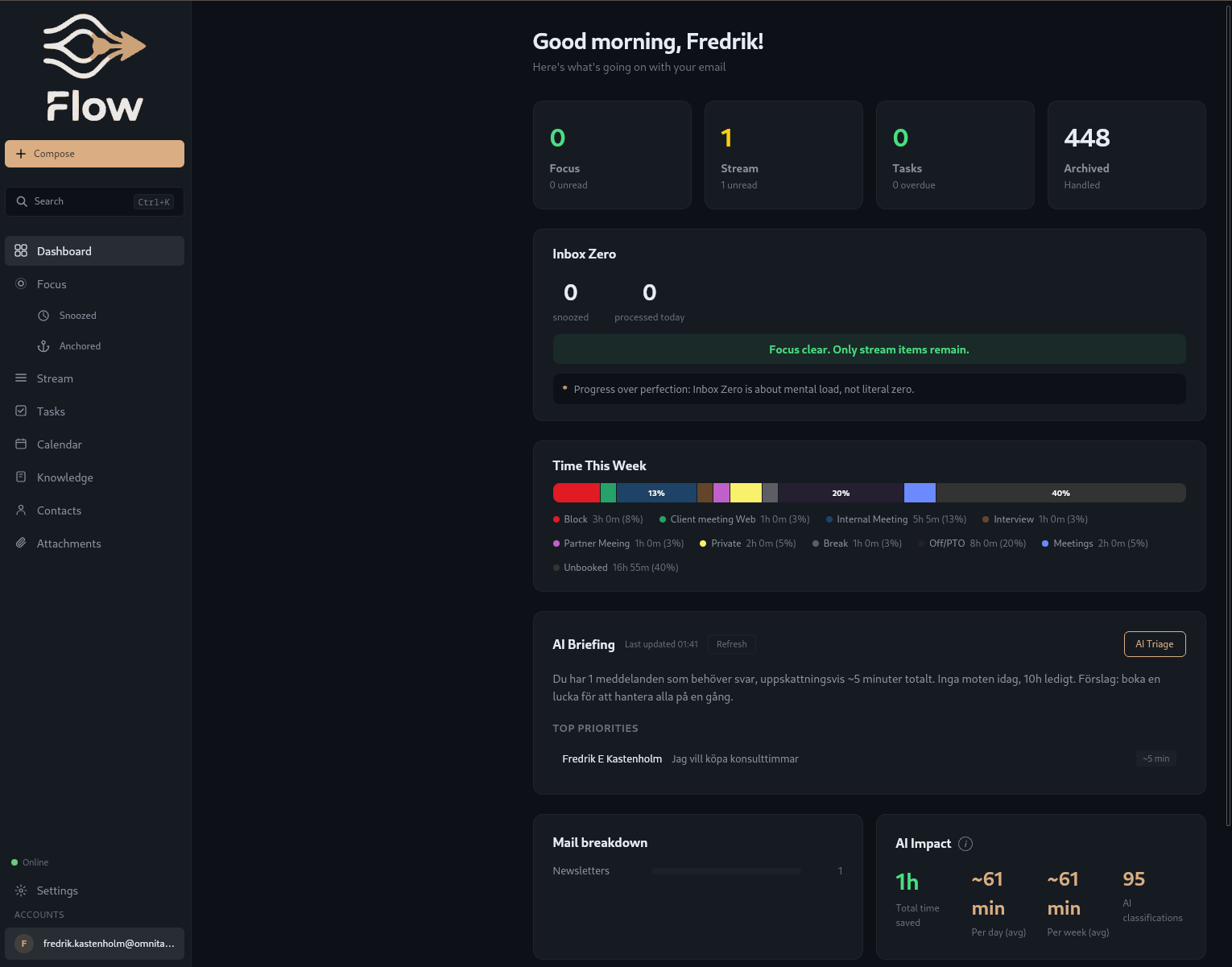
Flow dashboard showing AI-powered email triage, calendar integration, and inbox zero toolkit
Core capabilities

Four pillars of Flow

AI Secretary

AI that reads, classifies, and prioritizes your mail.

  • Smart triage (focus/stream)
  • Priority detection
  • Daily briefing
  • AI-drafted replies
  • Per-task model selection

Calendar Command

Your calendar as a productivity tool.

  • Google Calendar sync
  • Create events with attendees
  • Google Meet generation
  • Time usage tracking
  • Conflict detection

Offline & Security

Works without internet. Protects privacy by default.

  • Outbox queue
  • Smart body cache
  • Spy pixel blocker
  • DOMPurify sanitization
  • HTTPS-only unsubscribe

Multi-account

All your inboxes in one place.

  • Unified inbox
  • Per-account color coding
  • Account switcher
  • From-selector on reply
  • Per-account signatures
No vendor lock-in

Your AI, your rules

Bring your own API key. No markup, no middleman. Currently supports Anthropic Claude. OpenAI, Google Gemini, and local models (Ollama) coming soon.


Assign different models to different tasks: fast models for triage, powerful models for drafting, local models for privacy.

Everything included

The full feature set

Email

Smart TriageAI sorts your inbox into Focus and Stream categories
Priority DetectionUrgent messages rise to the top automatically
Manual OverrideMove messages between categories with a single action
Forward / Reply All / BCCFull reply controls for every conversation
Thread ViewChat-style conversation threads for context at a glance
Keyboard NavigationNavigate with j/k and process mail without a mouse
Multi-select & Bulk ActionsSelect multiple messages and act on them at once
Undo SendBrief delay window to cancel sent messages
Thread MutingSilence noisy threads without unsubscribing
Contact AutocompleteFast addressing from your contact history
Email SignaturesPer-account HTML signatures appended automatically
Email TemplatesSave and reuse common responses
Spy Pixel BlockerBlocks tracking pixels that monitor when you read email
Send LaterSchedule emails for optimal delivery time
Anchored MessagesPin important messages so they never scroll away
Quick QuoteHighlight text and quote it directly in your reply
Command PaletteCtrl+K to access any action instantly
Auto Follow-up RemindersGet reminded when sent messages go unanswered
Attachment LibraryBrowse all attachments across your accounts in one view
File AttachmentsDrag-and-drop files into any compose window
Contact ManagementView and organize your contacts with history
Desktop NotificationsOS-level alerts for new messages that matter
System TrayMinimize to tray with unread badge and quick actions

Calendar

Google Calendar SyncBi-directional sync with your Google calendars
CalDAV SupportConnect any CalDAV-compatible calendar server
Create Events with AttendeesAdd participants and send invites from Flow
Google Meet GenerationAuto-create Meet links when scheduling events
Event EditingModify events directly from Flow
Attendee Response StatusSee who accepted, declined, or is tentative
Week & Agenda ViewsSwitch between visual week grid and compact agenda
Event LabelsColor-code events for visual clarity
Conflict DetectionWarns you about overlapping events before booking
Weather ForecastOptional weather overlay for upcoming days
Buffer TimeAutomatic gaps between back-to-back meetings
Natural Language Event CreationType "lunch with Anna Friday 12:00" and it just works
Time Usage TrackingSee where your hours go across categories
Availability SharingShare open time slots without exposing calendar details
Mini Month CalendarCompact month overview in the sidebar

AI

Daily BriefingMorning summary of what needs your attention today
Smart RepliesAI-drafted responses you can edit, refine, or send
Per-task Model SelectionRoute each AI task to the right model for cost and quality
Bring Your Own API KeyUse your own keys with no markup or middleman
Knowledge BaseFeed the AI context about your work for better responses
Tone ProfilesDefine writing styles for different contexts and recipients

Offline

Outbox QueueCompose and queue emails when offline, sent on reconnect
Smart Body CacheConfigurable caching (7/15/30/60 days) for offline reading
Connectivity DetectionAutomatic online/offline status with visual indicator
Always Cache AnchoredPinned messages are always available offline
Disk Usage MonitoringTrack how much space cached emails consume

Settings

Dark / Light / System ThemeChoose your preferred appearance or follow OS setting
11 LanguagesFull interface localization across eleven languages
Configurable Sync IntervalSet how often Flow checks for new mail
Work Hours ConfigurationDefine your work schedule for smart notification timing
Triage RulesCustom rules to fine-tune how AI categorizes your mail
Get Started

Ready to take back your inbox?

Join the waitlist for early access. Free for Omnitas Consulting clients.

No commitment required.

You are on the list.

We will reach out when early access opens.